

Connected delivery workflows
Your systems. One connected delivery workflow.
Courier API integrations should reduce re-entry, not create another gap in the workflow. Review how your system can exchange delivery requests, status and completion records with our proprietary platform.
Authenticated connections
Versioned workflows
Traceable run history
Visual workflow canvas
See the logic behind every request.
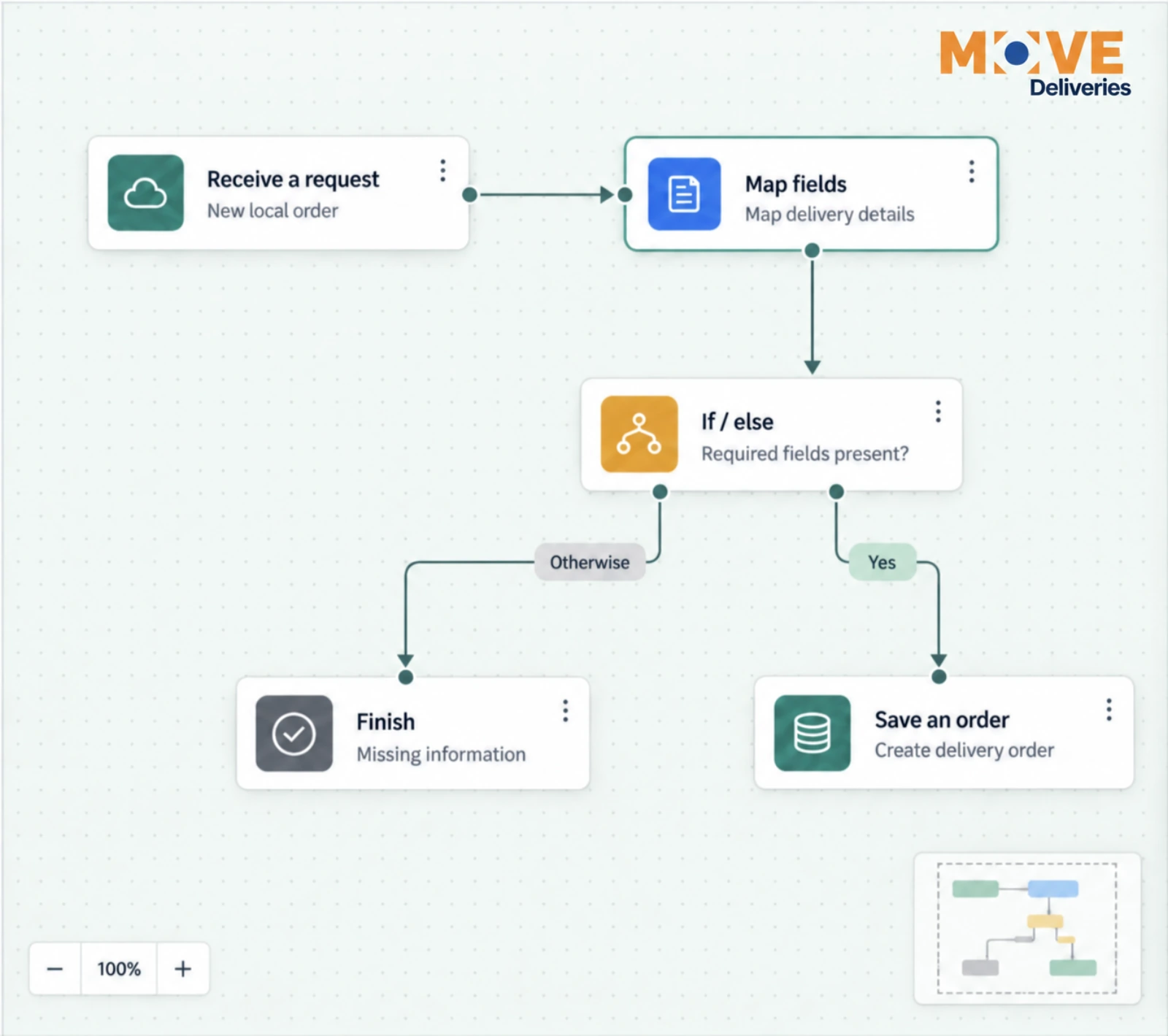
Connected blocks make the delivery workflow understandable. Our team configures the steps around your system and operating requirements, so intake, field mapping and decision rules follow a defined path.
In this example, a local order enters our proprietary platform, its fields are mapped, and a decision checks for required information. A complete request creates an order; an incomplete request follows a separate path without creating one.
Less duplicate entry. Clearer rules. A workflow your operations and technical teams can review together.
Software integration capabilities
Exchange information—not spreadsheets.
Our proprietary platform supports JSON REST connections over HTTPS. We review your API, permissions and required fields before confirming what can be connected.
Receive delivery requests
Authenticated listeners accept configured incoming requests. Map pickup, destination, timing and reference details into the delivery workflow.
Translate your data
Map field names and status values between systems. Build a new JSON payload or merge selected fields into a fetched record without discarding the rest.
Connect the next step
Use configured REST operations to retrieve records or send updates. Order events can trigger a workflow that passes the selected information to your system.
Control from setup to operation
Test the path. Keep the record.
An integration needs more than a successful first request. Our proprietary platform provides controls for reviewing changes and investigating what happened.
Preview before activation
Test sample input and simulated API responses without sending live requests or creating orders.
Protect the running version
Publish a fixed workflow version. Later draft changes do not silently alter the active process.
Keep access scoped
Connections and workflow records are organization-scoped. Saved connection credentials are encrypted.
Handle uncertainty deliberately
Run history records step outcomes. Duplicate-request controls and checkpoints support recovery; uncertain writes stop for review instead of being blindly repeated.
Before You Choose
Scope A Courier API Integration Around One Useful Workflow.
Which delivery detail does your team re-enter today, and where does the completion update need to return?
- Bring redacted API documentation and sample field names, not live credentials or patient details.
- Identify the request, status and exception events both systems need to exchange.
- Test duplicates and uncertain writes before activating the agreed workflow.
Use The Vendor Review Questions
Planning reference: HHS guidance on limiting unnecessary health-information disclosures. Confirm the requirements for your materials and service.
Courier API Integrations: Connect The Decision, Not Just The Data
Choose A Clear Starting Event
What action in your existing system should create a delivery request? Courier API integrations need an agreed starting point and a business reference that stays consistent. Review required fields, authorization and duplicate handling before a connection is accepted. A field mapping demonstration is not evidence that your particular system is already connected.
Define The Return Path
Decide which status and completion events must return, where they belong and who acts on an exception. Courier API integrations should reduce re-entry without making an attempted delivery look complete. Confirm how failed or repeated requests are identified, which system owns each field and how authorized users review the result.
Test A Representative Local Workflow
Use your normal request, a corrected address, an unavailable recipient and a completed delivery as separate acceptance cases. Courier API integrations are confirmed only after the interface, permitted data and workflow have been reviewed. Keep sensitive information out of public quote forms. Bring the technical contact and the operational owner into the same conversation so a connection supports the work your staff actually do.
Questions, answered
Integration planning questions
Can your platform connect to our existing software?
We review the software’s JSON REST API, available endpoints, access permissions and the required workflow. Connections use HTTPS and supported authentication such as a bearer token, API-key header or Basic authentication. We do not promise compatibility with every platform.
Do we build the workflow ourselves?
The canvas is the configuration workspace used by authorized administrators. Our team works with your operations and technical contacts to define the workflow, map fields and validate the result. A public website mockup is not customer access to the studio.
Can delivery updates return to our system?
Configured platform order events can start workflows that send selected information through a supported API operation. We confirm available status and completion fields, receiving endpoints and error handling. Proof files and attachments need a separate compatibility review.
What happens if a request fails or arrives twice?
Listeners can use a unique event ID to recognize duplicates. Execution history records the path and step outcomes. Some transient read failures can retry; an uncertain write is held for destination reconciliation to reduce the risk of duplicate changes.
What do you need to scope an integration?
Share API documentation, a redacted sample request and response, the fields you need to exchange, and the business events that should trigger updates. Do not send credentials or patient information through the website contact form. OAuth token refresh, XML/SOAP and multipart file uploads are not included in the current studio runtime.
Ready when you are
Connect delivery to the way you work.
Tell us which system you use and where manual delivery coordination slows your team down.